Syntax & Symbols
How It Works
NoShift.js uses ^ (caret) as a prefix to represent shifted symbols. The mapping is based on a Japanese JIS keyboard layout.
Symbol Map
This symbol mapping is based on the NoShift.js developer's keyboard (JIS layout).
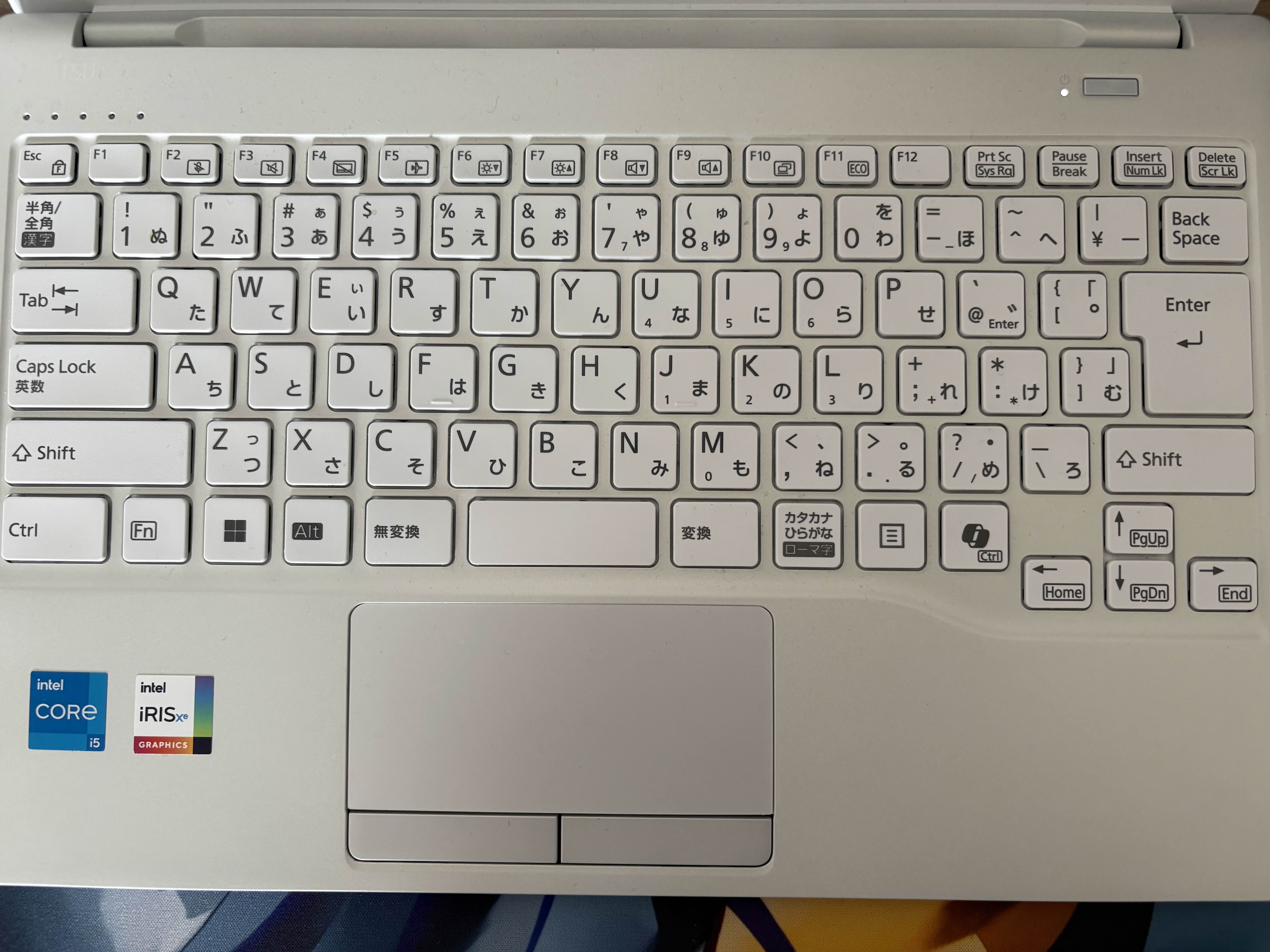
| Shifted Key | NoShift.js |
|---|---|
! | ^1 |
" | ^2 |
# | ^3 |
$ | ^4 |
% | ^5 |
| Capitalize | ^6 |
' | ^7 |
( | ^8 |
) | ^9 |
| ^ (Caret/XOR) | ^0 |
= | ^- |
| Shifted Key | NoShift.js |
|---|---|
~ | ^^ |
_ | ^\ |
` | ^@ |
{ | ^[ |
} | ^] |
+ | ^; |
* | ^: |
< | ^, |
> | ^. |
? | ^/ |
Template expression: ^4^[ → ${
Capitalize Modifier
^6 capitalizes the next character. Useful for class names, constants, etc.:
class ^6animal ^[
  constructor^8name^9 ^[
    this.name ^- name;
  ^]
^]
Compiles to:
class Animal {
  constructor(name) {
    this.name = name;
  }
}
Comments
Line comments use // as usual. Block comments use /^: to open and ^:/ to close:
// line comment

/^: block comment ^:/

/^:
  multi-line
  block comment
^:/
Compiles to:
// line comment

/* block comment */

/*
  multi-line
  block comment
*/
Escaping in Strings
Inside string literals (^2...^2, ^7...^7, ^@...^@), ^ sequences are not converted to shifted symbols. This allows you to include literal ^ characters:
^2^5^2
^7^5^7
^@^5^@
Compiles to:
"^5"
'^5'
`^5`
Template Literals
Template literals use ^@ (backtick) and template expressions use ^4^[ (${) to start and ^] (}) to end:
^@^5^4^[^2Hello World!^2^]^@Compiles to:
`^5${"Hello World!"}`Shebang
Use #^1 instead of #! for shebangs on the first line. The ^1 maps to ! as usual:
#^1/usr/bin/env node
console.log^8^2^6hello^2^9;
Compiles to:
#!/usr/bin/env node
console.log("Hello");
Bitwise & Shift Operations
JavaScript's bitwise operators work in NoShift.js using existing ^ sequences. The XOR operator (^) uses ^0 since the caret character is the NoShift.js prefix:
// XOR: ^0 --> ^
const a ^- 5 ^0 3;

// XOR assignment: ^0^- --> ^=
let b ^- 7;
b ^0^- 3;

// AND: @and, OR: @or, NOT: ^^
const c ^- 5 @and 3;
const d ^- 5 @or 3;
const e ^- ^^5;

// Left shift: ^,^,  Right shift: ^.^.
const f ^- 1 ^,^, 3;
const g ^- 8 ^.^. 1;
const h ^- -1 ^.^.^. 0;
Compiles to:
// XOR: ^0 --> ^
const a = 5 ^ 3;

// XOR assignment: ^0^- --> ^=
let b = 7;
b ^= 3;

// AND: @and, OR: @or, NOT: ^^
const c = 5 & 3;
const d = 5 | 3;
const e = ~5;

// Left shift: ^,^,  Right shift: ^.^.
const f = 1 << 3;
const g = 8 >> 1;
const h = -1 >>> 0;
Hello World
Input:
console.log^8^2^6hello ^6world!^2^9;Output:
console.log("Hello World!");Keyword Aliases
NoShift.js provides keyword aliases for logical and bitwise operators. These keywords are only replaced in code (not inside strings or comments):
| NoShift | JS | Description |
|---|---|---|
or | || | Logical OR |
and | && | Logical AND |
@or | | | Bitwise OR |
@and | & | Bitwise AND |
Compound Assignment
Compound assignment operators are also available as keyword aliases:
| NoShift | JS |
|---|---|
or^- | ||= |
and^- | &&= |
@or^- | |= |
@and^- | &= |
const a ^- true or false;\nconst b ^- 5 @and 3;\nlet c ^- null;\nc or^- ^2default^2;
Compiles to:
const a = true || false;\nconst b = 5 & 3;\nlet c = null;\nc ||= "default";
⚠ Breaking Changes
Since v0.15.0, the syntax has changed significantly from previous versions. ^3 is now # (private), ^6 is now Capitalize (was &), ^\ is now _ (was |), and keyword aliases (or, and, @or, @and) have been introduced. Please update your .nsjs files accordingly.